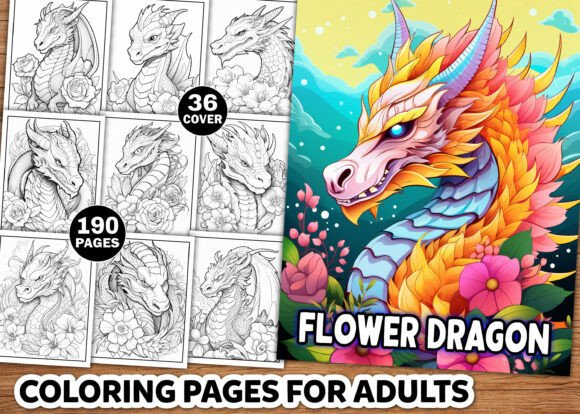
Flower Dragon Coloring Pages for Adults: A Practical Approach to KDP Interior Design and Creative Workflows
For anyone building a low-content or no-content publishing business on Amazon KDP, the challenge is rarely a lack of ideas. It is the gap between concept and a polished, sellable product. Flower Dragon Coloring Pages for Adults offers a specific solution: a complete, high-resolution collection of 190 black-and-white illustrations designed for an 8.5" x 11" book interior. But beyond the file count and dimensions, what matters is how this asset fits into an actual production workflow—from planning to upload.
This article focuses on the practical side of using such a resource. Whether you are an experienced KDP publisher, a freelancer helping clients build coloring books, or a creator exploring print-on-demand, understanding the process behind assembling, customizing, and deploying these pages can save hours of repetitive work and improve the consistency of your final product.
Understanding the Asset: What Is Included and Why It Matters
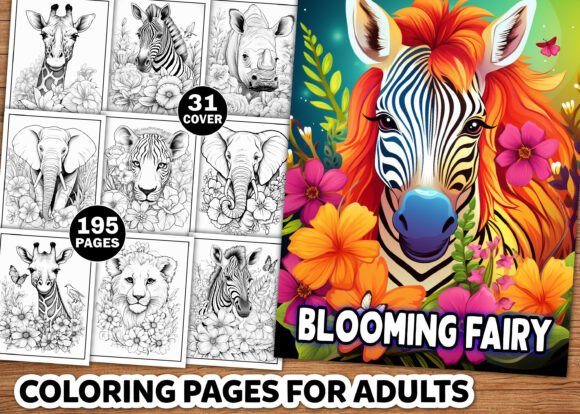
Before discussing workflow, it helps to clarify exactly what you receive. The download is a ZIP file containing 190 individual PNG files, 190 JPG files, and one PDF file—all at 300 DPI and sized to 8.5" x 11". There are also 36 bonus coloring images intended for cover design. Everything is black and white, print ready, and organized for direct use.
For a KDP interior, the PDF is usually the file you upload to Amazon. The PNG and JPG versions give you flexibility: you can edit individual pages in image editing software, rearrange them, or combine them with other assets. The high resolution ensures that lines remain crisp when printed, which is critical for adult coloring books where detail matters.
The combination of floral elements and dragon motifs targets an audience that enjoys nature-inspired fantasy. These are not simple children's outlines. The line work includes intricate petals, scales, wings, and flowing compositions that appeal to adults looking for a meditative, creative activity. This positioning matters when you write your book description and choose your keywords.
Where Flower Dragon Coloring Pages Fit in Your Publishing Process
Many KDP publishers treat interior assets as a final step—something you add after deciding on a title and cover. In practice, the interior should inform both. Here is how this collection integrates into a typical book creation workflow:
Before You Start Assembling the Book
Begin by reviewing the full set of images. Open the PDF or browse the PNGs to understand the variety of designs. Look for patterns in complexity, composition, and theme. Some pages may feature large floral borders with a small dragon centerpiece; others may be dense with foliage and swirling wings. Categorize them loosely into "detailed," "moderate," and "open" based on how much ink they use. This classification helps later when you decide page order and whether to include any single-sided printing considerations.
At this stage, also decide if you want to use all 190 pages in one book or split them into multiple volumes. A single 190-page book is substantial and can command a higher price point, but a series of 60-70 page books may appeal to buyers who prefer shorter sessions. Both approaches are valid, and having the full set in multiple formats makes either option straightforward.
During Interior Assembly
If you are using the provided PDF directly, the assembly is minimal. You open the file, verify that pages are in the correct order, and ensure there are no blank or misaligned spreads. However, many publishers prefer to add their own branding, page numbers, or introductory matter. Here, the individual PNG and JPG files become essential.
Import the images into your layout software—Adobe InDesign, Affinity Publisher, or even Canva for simpler projects. Insert them one per page, maintaining consistent margins. Because the files are already 8.5" x 11" at 300 DPI, they map directly to the trim size. You do not need to resize or re-scale, which eliminates a common source of quality loss.
If you want single-sided printing (images only on the right page, blank on the left), you can duplicate the set and insert blank pages programmatically. Many layout tools allow you to apply this pattern with a few clicks. The JPG format is particularly useful here because it loads quickly and is widely supported across software.
After Assembly: Quality Control and Upload Preparation
Once your document is laid out, export a draft PDF and run through quality checks. Look for:
- Page order: Ensure no images are duplicated or missing.
- Margins and bleed: Because your images are full-bleed at 8.5" x 11", confirm that critical line work is not too close to the trim edge. Some publishers add a 0.125" inner margin shift to prevent binding loss.
- Line density: Check that very dark areas do not clog when printed. The provided files are black and white, but previewing on screen is not the same as a physical test print. Consider printing one or two pages on your home printer to verify the line weight.
- Cover integration: The bonus 36 images can be used to create a cover that matches the interior style. Extract one or two strong designs, place them on the front and back cover, and apply a title in a complementary font. This maintains visual continuity between the cover and content.
After passing these checks, export your final PDF compliant with KDP specifications: PDF/X-1a or PDF/X-4, no layers, fonts embedded, and trimmed to 8.5" x 11". Upload to KDP, set your pricing and description, and you are live.
Practical Implementation Tips for Different Use Cases
The same asset set can serve multiple workflows. Here are three common scenarios and how to adapt the files accordingly.
Scenario 1: Solo Publisher Creating Multiple Books
If you plan to release several coloring books over time, treat this collection as a master library. Create a folder structure on your hard drive: one subfolder for the original PNGs, one for the JPGs, and one for the PDF. Then, within your book projects, reference these originals without moving or duplicating them. Use linked images in InDesign so that any future edits to the source files propagate automatically. This keeps your workflow clean and prevents version confusion.
For example, you might produce a "Flower Dragon: Volume 1" using pages 1–70, then "Volume 2" using pages 71–140, and a "Deluxe Edition" using all 190. The linked file approach means you only maintain one set of originals.
Scenario 2: Freelancer Designing for Clients
When a client asks for a custom coloring book, start from this collection and supplement with original designs or licensed elements. Because the files are high resolution and separated, you can extract individual dragons or floral sections and composite them into new layouts. The PNG format supports transparency if the background is removed, though for these black-and-white line arts, the white background is usually retained for print. If you need to isolate an element, use the pen tool or magic wand in Photoshop, then paste into a new document.
Keep a template file with your standard margins, bleed guides, and placeholder pages. Drop in the selected images, adjust order, and export. This reduces setup time for each new client project.
Scenario 3: Educator or Therapist Using the Pages as Resources
Not every use of this collection is commercial. Adult coloring is often used in mindfulness workshops, art therapy sessions, or as a relaxation tool for clients. In this context, the PDF format is ideal for printing individual pages on demand. Select designs that match the session theme—intricate patterns for focused attention, larger open areas for free expression—and print them at full size or reduced to fit letter or A4 paper.
Because the files are black and white, they photocopy cleanly. You can also enlarge or reduce them without significant quality loss, given the 300 DPI source. This flexibility makes the collection suitable for repeated use with different groups.
Long-Term Use and Organization
One advantage of owning a permanent asset like this is the ability to reuse and repurpose it across multiple products. Over time, you will develop your own system for tagging and retrieving specific designs. Consider maintaining a spreadsheet or digital asset management database with columns for:
- File name (corresponding to PNG and JPG numbers)
- Primary subject (dragon, flower, both, background elements)
- Complexity level (simple, moderate, intricate)
- Page orientation (portrait, square, landscape)
- Keywords (butterfly, vine, wing, scale, mandala)
This metadata lets you quickly assemble a themed subset without scrolling through 190 thumbnails. When you want to create a "Floral Mandala Dragons" book, you filter by those tags and have a ready-made list.
Compatibility and Technical Considerations
The provided formats cover nearly any publishing scenario. However, a few technical points deserve attention:
- CMYK vs. RGB: These files are likely RGB, which is fine for digital use. For print, KDP accepts RGB and converts to CMYK automatically. If you want precise control over black rendering, convert to grayscale or black-and-white before export.
- File size: 190 pages at 300 DPI results in a large PDF. Ensure your computer has sufficient memory to handle the file during layout. If performance lags, work with the JPG versions and only convert to PDF at the end.
- Print-on-demand constraints: KDP prints books using toner-based or inkjet printers. Very thin lines (under 0.5 pt) may drop out or appear faint. Preview at 100% zoom and if any lines seem too delicate, consider thickening them in vector software before export.
Conclusion
Flower Dragon Coloring Pages for Adults is more than a collection of images. It is a modular interior asset that, when combined with a thoughtful workflow, enables efficient book creation, customization, and long-term reuse. By understanding what is in the ZIP file, how to integrate it into your assembly process, and how to organize it for future projects, you can move from idea to published book with less friction and more consistency. Whether you are publishing your first coloring book or your fiftieth, having a reliable set of high-resolution line art at 300 DPI in multiple formats removes the most time-consuming part of interior production—leaving you free to focus on cover design, marketing, and growing your KDP catalog.