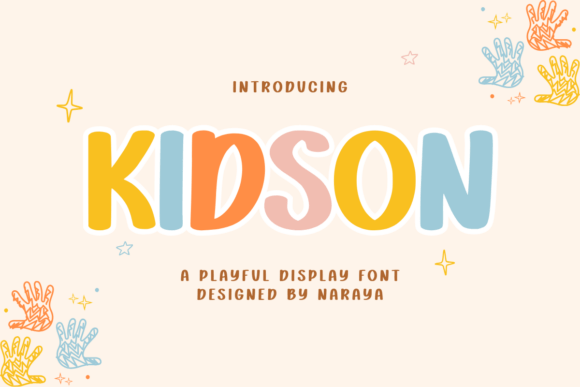
Kidson: A Playful Handwriting Font for Creative Workflows and Brand Identity
When you are building a brand, designing a product, or laying out a journal, every typeface you choose carries a specific set of associations. Some fonts feel corporate and distant. Others feel overly decorative and hard to read. Kidson sits in a more useful middle ground: a handwriting display font that blends playful bounce with clean legibility. It is not a novelty font meant for one-off headlines. It is a practical tool for people who need warmth, consistency, and readability across physical products, digital content, and printed materials.
This article walks through how Kidson fits into real creative and business workflows. You will learn where it works best, how to prepare files for different production methods, and how to maintain a cohesive look across multiple projects. Whether you run a small craft business, publish low-content books, or manage social media content for a brand, the goal here is to help you integrate Kidson deliberately and efficiently.
What Kidson Brings to a Creative Workflow
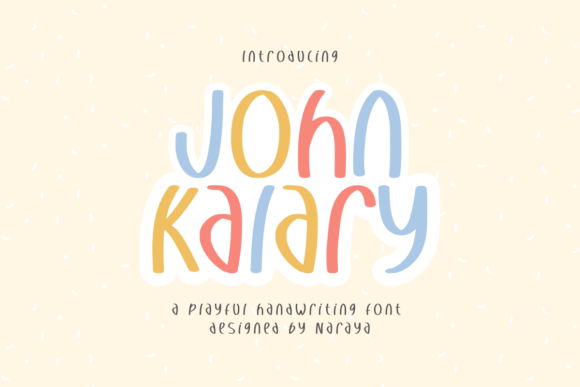
Kidson is a monolinear handwriting font. That means its stroke weight stays consistent across every letter, which is a deliberate design choice that affects how the font behaves in production and how it reads on the page. The letters have a bouncy baseline and rounded terminals, giving the font a friendly, handmade feel without drifting into illegibility.
From a workflow perspective, the monolinear structure is important. It simplifies cutting paths for machines like Cricut or Silhouette. It reduces the need to manually adjust stroke thickness when scaling the font up or down. And it ensures that the font holds up well in both small sizes, like planner linework, and larger sizes, like keychain text or quote posters.
If you compare Kidson to a traditional script font, the difference becomes obvious. Many script fonts rely on thick-thin contrast that looks elegant but causes trouble during vinyl weeding or acrylic engraving. Kidson sidesteps that problem. You get the charm of handwriting without the production headaches. That makes it a practical choice for anyone who needs to move from a design file to a finished product without unexpected hurdles.
Integrating Kidson into Your Branding and Product Design Pipeline
Before you drop Kidson into a design, it helps to think about where the font will appear across your workflow. A font that works for a sticker may not work the same way for a book interior or a social media graphic. Kidson handles all three well, but the preparation process differs slightly depending on the output format.
Brand Identity and Logo Work
If you are building a brand for a craft-based business, Kidson can anchor your visual identity. The font works especially well for lifestyle brands, children's products, home decor lines, and small-batch goods. Because the letterforms feel personal but remain readable, the font communicates approachability without sacrificing professionalism.
For logo design, use Kidson as the primary wordmark for short business names or taglines. Pair it with a clean sans-serif like Montserrat or Poppins for supporting text such as addresses, service descriptions, or fine print. This pairing preserves the handmade feel while keeping secondary information easy to scan. When you finalize your logo, export a vector version so you retain the clean path data Kidson provides. That vector file becomes your master asset for all future production runs.
Product Design: Keychains, Stickers, and Vinyl Decals
Custom acrylic keychains are one of the strongest use cases for Kidson. The font's smooth, even strokes cut cleanly on laser machines and routing tools. When you design a keychain file, keep these points in mind:
- Minimum stroke width. Because Kidson is monolinear, the entire letterform shares the same thickness. For acrylic keychains, ensure the stroke is thick enough to survive cutting and sanding. Scale the font to at least 18pt for small keychains, larger if the design includes fine details.
- Letter spacing. Kidson has a natural bounce that looks best with moderate tracking. Avoid tightening the spacing too much, or the ascending and descending letters may collide. For physical products, a little extra space around each letter improves readability at a glance.
- File preparation. Export your design as an SVG or DXF for cutting machines. Kidson's vector paths are clean, so you rarely need to simplify or repair curves before cutting. That saves time during production prep.
For vinyl stickers and decals, Kidson behaves predictably during weeding. The consistent stroke width means you are less likely to tear thin sections of the vinyl. Use the font for single-word decals, short phrases, or names. Longer sentences work too, but keep the text under six words for best results on small sticker sizes.
Using Kidson in Low-Content Book Publishing and Planner Layouts
KDP interiors and planner layouts require fonts that balance personality with functionality. Readers need to parse the text quickly, especially in dated planners, habit trackers, and journal prompts. Kidson delivers that balance because it is a display font that does not sacrifice legibility for style.
Journal and Diary Layouts
For prompted journals, use Kidson for section headers, quote pages, and title spreads. The font sets a warm, personal tone that encourages writing. Pair it with a readable sans-serif for instruction text and page numbers. This combination lets Kidson carry the personality while the supporting font handles the navigation.
When you design a journal interior, pay attention to line height. Kidson's bouncy ascenders and descenders need enough vertical space to avoid overlapping. Set your line height at 1.5 to 1.8 times the font size. Test print a few pages before you upload the final file to KDP. A quick physical check catches spacing issues that screen previews often hide.
Planner and Organizer Pages
Kidson works well for monthly headers, weekly section titles, and motivational quotes inside planners. Keep the body text in a simpler font. Let Kidson do the work of drawing attention to specific areas of the page. If you are selling printable planners, include a font guide so customers know exactly which fonts you used and where they can purchase them for their own edits.
For digital planners used in apps like GoodNotes or Notability, Kidson renders clearly on retina screens. Test the font at different zoom levels to confirm the letterforms stay crisp. Because Kidson is a display font, it reads best at 14pt and above on tablet screens. Use it for titles and decorative elements, not for long-form journaling prompts.
Kidson in Social Media Content and Digital Assets
Social media content needs to stop the scroll. Kidson helps you do that without relying on heavy graphics or complex illustrations. A short quote set in Kidson against a pastel background can be enough to communicate your brand's tone and encourage engagement.
When you design Instagram posts, Pinterest pins, or Facebook cover images, follow these guidelines:
- Keep text short. Kidson's charm comes through strongest in headlines and short phrases. A line or two of Kidson text reads naturally. Longer blocks start to feel crowded.
- Use high contrast. Because Kidson is a monolinear handwriting font, it benefits from clear contrast between the text and the background. Light backgrounds with darker text work best. Avoid busy background images behind the font.
- Export for the platform. Social media platforms compress images differently. Export your graphics at the recommended dimensions for each platform and keep the resolution at 150 DPI for digital use. The font will render consistently across devices if you rasterize the text in your design software before exporting.
For video content like Reels or TikTok overlays, Kidson works as lower-third text or quote cards. Render the text as part of the video file rather than relying on platform text tools, so you control the exact appearance of the font.
Preparing Files for Cutting Machines and Physical Production
One of Kidson's strongest workflow advantages is how it interacts with cutting machines. If you produce physical goods, you already know that font choice directly affects production speed and material waste. Kidson reduces both.
Here is a practical file preparation sequence for vinyl cutting or acrylic routing:
- Type your design in Kidson using design software like Adobe Illustrator, Inkscape, or the free version of Canva (which supports font uploads).
- Convert the text to outlines or paths. This step ensures the font data stays intact when you move the file to your cutting software.
- Check for overlapping paths. Kidson's monolinear structure rarely creates overlaps, but a quick inspection saves time later.
- Scale the design to the final production size. Avoid scaling after converting to outlines if possible, as some software distorts paths when scaling vector shapes.
- Export as SVG or DXF. These formats preserve the path data for most cutting machines.
- Import into your cutting software and run a test cut on scrap material before the final run.
This process takes about 10 minutes once you are familiar with it. The consistency of Kidson's strokes means you will spend less time troubleshooting cuts and more time producing finished goods.
Maintaining Visual Consistency Across Projects
If you use Kidson across multiple product lines or content streams, consistency becomes a practical concern. Font licenses, file versions, and color palettes all need to align. Create a simple brand style guide that includes:
- The exact font file name and version of Kidson you purchased.
- The license type (desktop, web, or app) so you know where you are legally allowed to use the font.
- Recommended pairings with supporting fonts.
- Minimum and maximum sizes for physical and digital use.
- Approved color hex codes or Pantone values for the font in your products.
Store your Kidson font files in a shared folder that everyone on your team can access. If you work alone, back up the font file along with your project templates. Redownloading fonts from a purchase history page wastes time and risks version mismatches.
Planning Your Purchases and Licensing
Kidson is available through various font marketplaces. Before you buy, check the license terms against your actual use. If you plan to use the font in physical products for sale, look for a license that covers commercial use. If you only need the font for social media graphics or personal journals, a standard desktop license is sufficient.
Consider buying the full font family if it includes multiple weights or styles. A single weight is fine for most projects, but having a lighter or bolder variant gives you flexibility without needing to fake boldness through software distortion (which often degrades the font's clean curves).
Long-Term Use and Workflow Efficiency
Once Kidson is integrated into your workflow, the time savings compound. You stop searching for the right font for each new project. You know how the font behaves in your tools. You have templates that already use the font correctly. Your production files require fewer adjustments between design and output.
For recurring product lines, save project templates with Kidson already applied. A template for a standard acrylic keychain design, a template for a weekly planner header, and a template for an Instagram quote graphic will each save you 15 to 30 minutes per project. Over a year, that time adds up to hours of productive work you can redirect toward new designs or customer outreach.
Kidson also works well in collaborative workflows. If you hire a designer or virtual assistant, send them your style guide and templates. The font's predictable behavior reduces back-and-forth revisions. Your team can produce work that aligns with your brand without requiring constant oversight.
Practical Observations from Production Use
After working with Kidson across multiple projects, a few patterns emerge. The font performs best when you let its natural bounce guide your layout. Trying to force Kidson into rigid, perfectly aligned grids often makes the design look stiff. Instead, center your text, use asymmetrical layouts, and pair it with organic shapes like hand-drawn borders or watercolor backgrounds.
If you are combining Kidson with other handwriting fonts, limit yourself to one additional font at most. Too many handwriting styles in one design create visual noise. Kidson pairs well with a simple sans-serif for contrast, as mentioned earlier, or with a clean serif for a more traditional feel.
For print projects, always request a proof or run a test print. Screen rendering differs from ink on paper, and subtle differences in spacing or line weight become visible at full size. A test print costs very little and prevents the disappointment of a full print run that does not match your expectations.
Finally, consider using Kidson as part of a larger narrative strategy. The font's friendly, handmade look aligns well with brand stories about craftsmanship, small-batch production, and personal connection. When customers see Kidson on your packaging or social media, they associate that warmth with your brand. That association builds trust over time, which matters for small businesses competing against larger, less personal competitors.
Final Thoughts on Workflow Integration
Kidson is more than a decorative font. It is a functional asset that fits into real production pipelines for physical goods, digital content, and published materials. By understanding how the font behaves in different contexts, you can plan your projects around its strengths and avoid common pitfalls like spacing issues, cutting errors, or licensing gaps.
Start with one project. Prepare your files carefully, test your output, and note what worked in a short project log. The next time you use Kidson, you will complete the same tasks faster and with fewer adjustments. Over time, the font becomes a reliable part of your toolkit, allowing you to focus on the creative decisions that drive your business forward rather than the technical details that slow it down.