Tiny Magical Homes in Jars Coloring Book: What to Know Before You Create, Print, or Publish
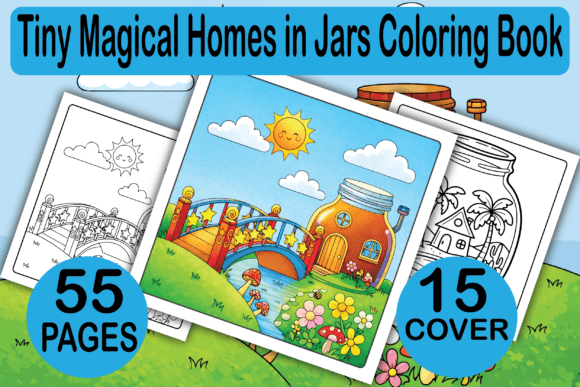
Tiny Magical Homes in Jars Coloring Book has become a popular niche for creators, entrepreneurs, and colorists alike. The core product is straightforward: a digital printable collection of 55 detailed illustrations showing miniature homes housed inside glass jars. The concept is whimsical, the audience is broad, and the potential applications range from KDP interior publishing to POD merchandise and even personal relaxation. But the simplicity of the product can lead to rushed decisions that affect quality, usability, and ultimately, customer satisfaction.
If you are looking at Tiny Magical Homes in Jars Coloring Book as a product to buy, resell, or create your own version of, you need to understand what works, what does not, and where most people stumble. This guide walks through common mistakes, overlooked details, and practical adjustments that make the difference between a product that sells and one that sits.
Why Tiny Magical Homes in Jars Captures Attention
The appeal of this coloring book lies in its combination of fantasy and structure. Each jar contains a complete tiny world—a cottage, a treehouse, a lighthouse, or a library—rendered in black-and-white line art. The jar adds a defined boundary, which makes the coloring experience less intimidating than a full-page landscape but more engaging than a simple mandala. Adults appreciate the meditative focus, while younger colorists enjoy the storytelling aspect. For creators on Amazon KDP or POD platforms, this format offers a repeatable concept that is easy to market and differentiate with cover design and interior variations.
However, the very qualities that make this niche attractive also introduce pitfalls. The product is not a single file; it is a package of 55 individual pages delivered as a PDF, plus additional formats like JPG, PNG, EPS, and SVG. It also includes 15 book cover backgrounds. Understanding how these components work together—and where they can fail—is essential.
Mistake One: Treating the PDF as a Final, Ready-to-Upload File
Many buyers assume the included PDF is already formatted for Amazon KDP or their chosen printer. But the PDF is a raw interior file with bleed on an 8.5 x 8.5 inch trim size. It is ready for upload, but only if you verify three things:
- Bleed settings: The file includes bleed, which means the artwork extends slightly beyond the trim line. If you are using a printer that requires no bleed, or if you crop the file incorrectly, you will lose part of the illustration near the edges. Always check your printer's specifications and adjust if needed.
- Page count: 55 pages may not meet the minimum page count requirements for some POD platforms. Amazon KDP requires a minimum of 24 pages for a paperback, so 55 is fine, but always confirm for your specific distribution channel.
- File compression: When you open the PDF, check that the line art remains crisp. Some PDF generating tools compress images, which can make fine lines appear fuzzy or broken, especially on larger print sizes. Open a page at 100% zoom and inspect the details in the jar illustrations.
What many creators do instead is upload the PDF without testing a physical proof. They assume the bleed will be handled automatically, or they trust the preview tool. Order a proof copy before listing live. It is the only way to confirm the jar lines are sharp, the margins are even, and the binding does not eat the image edges.
Mistake Two: Overlooking the Value of the Additional File Formats
The product package includes JPG, PNG, EPS, and SVG formats of each illustration. Each format serves a different purpose, and ignoring them limits what you can do with the artwork.
JPG files are good for quick previews or digital coloring on a tablet, but they are lossy and not suitable for professional print work. PNG files preserve transparency, making them ideal for layering onto backgrounds or creating stickers and POD items like mugs or tote bags. EPS and SVG files are vector formats. If you have design software like Adobe Illustrator or Inkscape, you can open these, edit the line thickness, resize without quality loss, and even recolor the entire jar for themed editions. The vector files are the hidden gems of this package.
A better approach is to treat the vector files as your master copies. If you want to create a seasonal version of the coloring book, open the SVG files, adjust colors or add decorative elements, then export your own PDF with custom margins and paper size. This saves hours of manual redrawing and ensures consistency across all 55 designs.
Mistake Three: Neglecting the Cover Backgrounds
The product includes 15 book cover backgrounds. Many users pick one randomly or use the first one that looks pleasant. That is a missed opportunity. Your cover is the primary sales driver on Amazon and POD stores. A generic or cluttered background can make your book look amateurish, even if the interior art is excellent.
The backgrounds are provided as separate files, likely in high resolution and various color schemes. Before committing to one, test how your title text looks overlaid on each background. Some backgrounds have busy patterns that compete with small text. Others have dark tones that require white or light-colored fonts. Consider the contrast and readability at thumbnail size because most customers will first see your book as a small image on a search results page.
Also, think about your target audience. If you are marketing to adults for relaxation, choose backgrounds with muted, calming colors. If you are aiming at children or creative teens, brighter colors with playful patterns work better. The background sets the mood for the entire book, so treat it as a design decision, not an afterthought.
Mistake Four: Misunderstanding the Audience for the Coloring Book
Tiny Magical Homes in Jars Coloring Book is marketed for both adults and kids. But the same product does not work the same way for both groups. Adult colorists prefer intricate details, small spaces, and line art that challenges fine motor control. Younger children need thicker lines, simpler compositions, and larger coloring areas to avoid frustration.
The 55 designs in this collection are detailed. They are better suited to adult coloring or older kids (ages 10 and up). If you are selling on Amazon KDP, your product listing should reflect this. Avoid calling it a "children's coloring book" in the subtitle if the line art is fine and dense. You will get returns, negative reviews about complexity, and potential listing suppression for mismatched categorization.
Instead, position it as an "adult coloring book" or "all-ages relaxation coloring book." In the description, mention that younger children may require guidance or that the pages work well for older kids who enjoy detailed craft time. This sets accurate expectations and keeps your ratings positive.
Mistake Five: Ignoring the Print-Ready Specifications
The interior PDF is formatted at 8.5 x 8.5 inches with bleed. That square format is charming but uncommon for some POD platforms. Some printers default to 8.5 x 11 inch letter size or 6 x 9 inch trade paperbacks. If you upload this PDF without adjusting the trim size in your platform's settings, the system may crop or stretch the pages.
Before you upload, check these details:
- Trim size: Confirm your chosen platform supports 8.5 x 8.5 inch books. Amazon KDP does, but some distributors may not. If they do not, you will need to resize the file using your design software and the vector files provided.
- Bleed requirement: Different printers expect different bleed measurements. KDP expects 0.125 inches of bleed on all sides. Your PDF includes this, but if you use a different printer, verify their bleed specification.
- Color space: The PDF is black and white, which is correct for a coloring book interior. But ensure your upload settings do not force a CMYK conversion that may alter the grayscale values. Keep the file in grayscale for best results.
A common oversight is assuming that because the PDF says "with bleed," it is universally compatible. It is not. Always confirm the specs for your platform and printer of choice.
Mistake Six: Using the Interior Preview Ineffectively
Amazon KDP requires an interior preview for print books. Many creators upload the sample pages from the PDF without checking how they appear in the preview tool. If the preview shows only partial pages, or if the jar art is clipped by the binding margin, customers will assume the whole book is poorly formatted.
When you generate your preview file, include sample pages that show a full jar without major cropping. If your preview tool lets you select specific pages, choose ones where the jar sits away from the gutter (the inner margin near the binding). The product includes diverse jar compositions, so select a few that have central or right-leaning focal points for the preview. This gives customers confidence that the art will display well in a printed book.
Also, consider creating a digital sample that shows a few full pages in the product listing images. This is especially helpful on sites where the "Look Inside" feature is not available. A simple split-image showing two or three completed colorings alongside the line art can increase click-through rates significantly.
Mistake Seven: Forgetting to Test the Market Position
Tiny Magical Homes in Jars is a specific niche. It competes with other fairy house, miniature world, and magic jar coloring books. If you list on KDP without differentiating your cover, title, or description, your book will blend into a crowd of similar products.
Use the 15 cover backgrounds and your design skills to create a unique look. Consider adding a subtitle that highlights a special angle: "55 Tiny Magical Homes in Jars: A Relaxing Coloring Book for Adults Featuring Whimsical Fairy Dwellings and Secret Garden Hideaways" is more searchable than a generic title. Also, use the description to mention that the interior includes detailed jar illustrations suitable for gel pens, colored pencils, or markers, and that the pages are printed single-sided to prevent bleed-through. These small details matter to buyers comparing similar products.
What to Check Before You Buy or Use This Product
Whether you are a colorist looking for relaxing pages or a creator planning to publish on KDP, these steps will save time and avoid disappointment:
- Inspect the sample images. Look at a few pages at full resolution to assess line thickness and detail level. If the lines are too thin for your preference, you may want to find a version with bolder strokes.
- Verify your printer's bleed and trim requirements before uploading. The PDF is 8.5 x 8.5 with bleed, but confirm that your printer matches that exactly.
- Test a proof. Even if the digital file looks perfect, print a physical copy to see how the binding affects the gutter area and whether the bleed is executed correctly.
- Use the vector files if you plan to modify or resize the art. The EPS and SVG formats give you full control without quality loss.
- Review the cover backgrounds carefully. Test your title font and layout against each background to find a combination that reads well at thumbnail size and fits your target audience.
The Tiny Magical Homes in Jars Coloring Book package offers a complete ecosystem for publishing and creative use. The illustrations are charming, the formats are flexible, and the cover backgrounds reduce the workload for cover design. But the product is only as good as the preparation you put into using it correctly. By avoiding the common mistakes outlined here, you will deliver a polished, professional product that meets buyer expectations and performs well in the marketplace.
Take the time to test your files, understand your audience, and treat each format with the attention it deserves. The result will be a coloring book that stands out for its quality, not just its concept.